
Understanding QCMet#
This tutorial explains the core concepts and architecture of QCMet benchmarks.
Running Benchmarks#
The easiest way to run a benchmark is using the __call__ function:
from qcmet import T1
from qcmet.devices import IdealSimulator

# Create benchmark
experiment = T1()

# Create device
ideal_sim = IdealSimulator()

# Get results
results = experiment(device=ideal_sim, num_shots=1000)
The __call__ function sequentially executes generate_circuits(), run() and analyze() (and plot() if it is implemented). These functions will be described in further detail below.
The BaseBenchmark Class#
All benchmarks in QCMet inherit from BaseBenchmark, which provides a consistent interface:
generate_circuits()- Generate the benchmark circuitsrun(device, num_shots, max_circs_per_job)- Execute circuits on a device with option to select maximum number of circuits to be submitted per jobanalyze()- Process results and compute metricsplot()- Visualize results (if implemented)
The BaseDevice Class#
Devices inherit from BaseDevice and implement:
run(circuits, num_shots, max_circs_per_job)- Execute a list of circuits and return measurement counts
This abstraction allows benchmarks to run on any device without modification.
Under the hood, QCMet heavily uses Qiskit’s features (in particular, circuits are represented as Qiskit’s QuantumCircuit).
Metric Categories#
QCMet organizes benchmarks into categories based on what they measure:
Qubit Quality Metrics#
T1: Relaxation time (energy decay)
T2: Relaxation time (dephasing)
Idle Qubit Oscillation Frequency: Non-Markovian noise induced coherence revivals
Gate Execution Quality Metrics#
Clifford RB: Average gate error rate
Interleaved RB: Specific gate error rate
Over/Under Rotation: Systematic rotation errors
Cycle Benchmarking: Average fidelity of a repeated layer
Gate Set Tomography: Full characterization of process fidelity
Circuit Execution Quality Metrics#
Quantum Volume: Holistic circuit complexity measure
Mirrored Circuits: Target circuit performance benchmark
Upper Bound on Variation Distance: Quantum accreditation protocol
Well-studied Task Execution Quality Metrics#
QFT: Quantum Fourier Transform fidelity
VQE: Energy expectation value reproducibility
QScore: Metric based on using QAOA for a MaxCut problem
Hamiltonian Simulation: Ability to perform Hamiltonian dynamics
Example: Exploring the T1 Benchmark#
from qcmet import T1
from qcmet.devices import NoisySimulator
import numpy as np

# Create benchmark
t1 = T1(num_idle_gates_per_circ=np.arange(1, 1000, 100))

# Generate circuits
t1.generate_circuits()

# Inspect the experiment data structure
print("Experiment data columns:", t1.experiment_data.columns.tolist())
print("\nFirst few rows:")
print(t1.experiment_data.head())
Experiment data columns: ['hash', 'id', 'circuit']

First few rows:
                               hash                                    id  \
0  010b614c4773c3cc057914f2452e1abd  cef8fd5b-a171-45e8-a7d0-f5d327197331
1  60f69467bcf27869429777838f863958  05c0eb10-8161-4942-93e6-4c8ea5957cd5
2  5234934c916137d9c1140bbc0850be78  e2fb6581-90a7-421e-a934-bb4f134b9395
3  e0580ef9e815af069c70ed84a14429d1  d6b6a2e0-17c9-4037-80b5-f59826ca0201
4  255ef6a71771ba7f1d2e3c87e6efaa00  2166ce39-64b0-4aea-b773-20d5bf3cb1a2

                                             circuit
0  ((Instruction(name='x', num_qubits=1, num_clbi...
1  ((Instruction(name='x', num_qubits=1, num_clbi...
2  ((Instruction(name='x', num_qubits=1, num_clbi...
3  ((Instruction(name='x', num_qubits=1, num_clbi...
4  ((Instruction(name='x', num_qubits=1, num_clbi...
# Look at a circuit
print("First circuit:")
print(t1.circuits[0])
First circuit:
        ┌───┐ ░ ┌───┐ ░  ░ ┌─┐
     q: ┤ X ├─░─┤ I ├─░──░─┤M├
        └───┘ ░ └───┘ ░  ░ └╥┘
meas: 1/════════════════════╩═
                            0
# Run on device
# Option to set maximum number of circuits per job when device has a limit on the circuits submitted per job
device = NoisySimulator()
t1.run(device, num_shots=1024, max_circs_per_job=3)

# Check the measurements have been added
print("After running, columns:", t1.experiment_data.columns.tolist())
print("\nSample measurements:")
print(t1.experiment_data['circuit_measurements'].head())
After running, columns: ['hash', 'id', 'circuit', 'circuit_measurements']

Sample measurements:
0     {'0': 1, '1': 1023}
1    {'0': 22, '1': 1002}
2     {'0': 44, '1': 980}
3     {'0': 63, '1': 961}
4     {'0': 73, '1': 951}
Name: circuit_measurements, dtype: object
The Experiment Data DataFrame#
Each benchmark stores its data in a pandas DataFrame with:
hash: Circuit hash for identificationid: Unique circuit IDcircuit: The QuantumCircuit objectcircuit_measurements: Measurement counts (added after running)Additional benchmark-specific metadata
Configuration Dictionary#
Each benchmark has a config dictionary storing its parameters:
print("T1 configuration:")
print(t1.config)
T1 configuration:
{'num_idle_gates_per_circ': array([  1, 101, 201, 301, 401, 501, 601, 701, 801, 901])}
Saving and Loading#
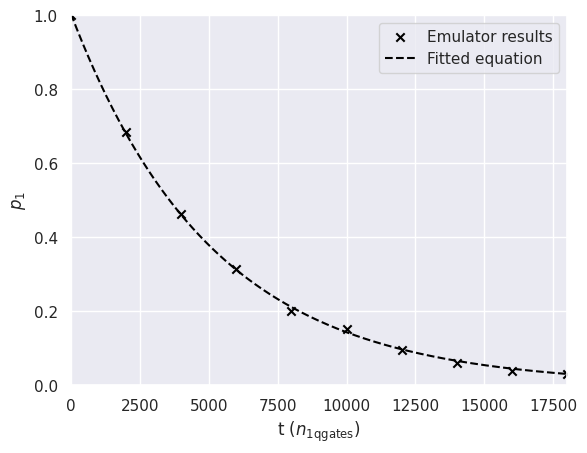
Benchmarks can save their state for later analysis:
from pathlib import Path

# Create benchmark with save path
t1_saved = T1(
    num_idle_gates_per_circ=np.arange(1, 20000, 2000),
    save_path=Path("./t1_results")
)

# Generate and run
t1_saved.generate_circuits()
t1_saved.run(device, num_shots=1024)

# Analyze and save
results = t1_saved.analyze()
print(f"Results saved to: {t1_saved.file_manager.base_path}")
Creating dir structure at t1_results/T1_20251222_170315
Results saved to: t1_results
Offline Mode#
You can generate circuits without a device for later execution:
# Create benchmark with save enabled
t1_offline = T1(
    num_idle_gates_per_circ=np.arange(1, 500, 100),
    save_path=Path("./t1_offline")
)

# Generate circuits
t1_offline.generate_circuits()

# Run without device (saves circuits for later)
t1_offline.run()  # No device specified

print("Circuits saved for offline execution")
Creating dir structure at t1_offline/T1_20251222_170315
Circuits saved for offline execution